
Microsoft’s September 8, 2026 security release gave administrators two problems at once: an unusually large vulnerability list and two Windows flaws already being used in attacks. The Zero Day Initiative (ZDI) counted 972 new CVEs in its review. The operational priority, however, is not to work through 972 items in numerical order. It is to identify affected systems, close the exploited paths and deploy the right updates without losing sight of later fixes. 3
Status checked September 25, 2026. Microsoft released a corrective, out-of-band Windows update on September 14, and its Exchange Server update guidance was revised on September 24. Teams planning deployment now should consult those later documents, not only the original Patch Tuesday announcement. 1
What the 972-CVE figure actually means
972 is ZDI’s count of new Microsoft CVEs, not Microsoft’s statement that every organization must install 972 individual patches. ZDI’s wider accounting reaches 997 when it includes external and Chromium-related vulnerabilities. Microsoft separately notes that cumulative or bundled updates can address multiple vulnerabilities through a much smaller number of deployments. 3
The often-repeated 112 Critical figure also needs qualification. The Times of India reported 112, while ZDI gave a Critical tally of 114 within its broader accounting; BleepingComputer counted 105 Critical vulnerabilities under a narrower Patch Tuesday method. Those figures should not be presented as interchangeable. Publication dates, inclusion of browser and cloud issues, and counting rules change the result. For patch planning, an affected product and an observed exploit matter more than an unqualified monthly total. 4
The release spans more than Windows. Microsoft’s September summary includes Office, SharePoint, Exchange Server, SQL Server and Azure alongside Windows client and server products. A Windows cumulative update therefore cannot, by itself, stand in for every application or server update an organization may need. 5
The September vulnerabilities that should drive the queue
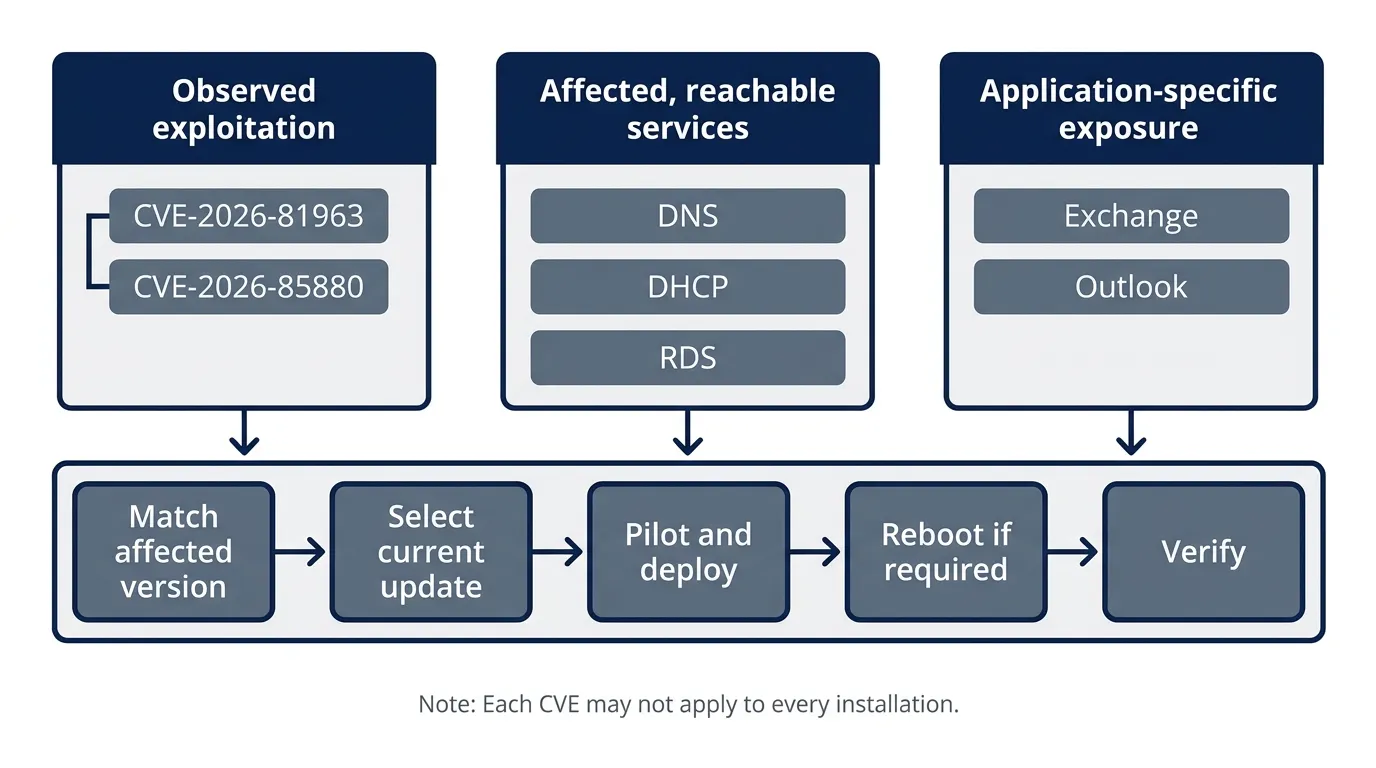
Microsoft identified CVE-2026-81963 and CVE-2026-85880 as exploited before fixes were released. CISA added both to its Known Exploited Vulnerabilities catalog on September 8. Other September flaws may be severe, but the distinction between observed exploitation and potential exploitation should determine the first response. 5
CVE | Affected component | Why it belongs in the priority queue |
CVE-2026-81963 | Windows Update Stack | An exploited local privilege-escalation flaw. CISA says an attacker can elevate privileges up to SYSTEM. Prioritize affected Windows devices, particularly where an initial foothold would have high impact. 6 |
CVE-2026-85880 | Windows Advanced Local Procedure Call (ALPC) | An exploited local privilege-escalation flaw involving a heap-based buffer overflow. Put it in the same urgent Windows deployment group. 6 |
CVE-2026-69730 | Windows DNS Server | A Critical, CVSS 9.8 remote-code-execution issue in ZDI’s September list. Prioritize servers running the affected DNS role according to their reachability and importance. 3 |
CVE-2026-72979 | Windows DHCP Server | A Critical, CVSS 9.8 remote-code-execution issue. Check which DHCP servers are affected rather than assuming every Windows machine runs the vulnerable service. 3 |
CVE-2026-69525 | Remote Desktop Services | ZDI highlights a CVSS 9.8 remote-code-execution risk and describes an in-network attack requirement. Assess where the affected service is enabled and reachable. 3 |
CVE-2026-55007 | On-premises Exchange Server | ZDI describes a possible server-side code-execution attack involving a crafted Visio attachment. Microsoft lists the CVE in its September Exchange security update. Prioritize affected mail servers and check the update for their exact version. 3 |
CVE-2026-78509 | Microsoft Outlook | A Critical, CVSS 9.8 remote-code-execution flaw that ZDI flags for its Preview Pane attack vector. Include affected Office installations in the rollout rather than concentrating solely on servers. 3 |
Exploited Windows flaws come first
Neither exploited Windows flaw is described as an unauthenticated, internet-facing entry point. Both are local privilege-escalation issues: their significance is what an attacker may do after obtaining the access needed to reach them. That does not make them safe to defer. CISA’s catalog lists September 22, 2026 as the remediation due date for both—a date that had passed by this article’s September 25 status check. Organizations should use their own exposure and incident-response findings to determine whether unpatched systems also warrant investigation. 6
Then prioritize exposed services and applications
The remainder is not a simple ranking by CVSS score. A DNS or DHCP flaw matters most where that role is present; the Exchange issue matters to organizations running an affected on-premises server; Outlook requires its own Office deployment path. ZDI’s release-time review did not mark the other CVEs in the table as actively exploited. That is a description of the information available at release, not a guarantee about future activity. Check current MSRC advisories when building the final change list. 3
How to deploy and verify the updates
Step 1: Match CVEs to assets and supported versions
Start with an inventory of Windows client and server builds, installed server roles, on-premises Exchange versions and Office deployments. For each relevant CVE, consult Microsoft’s Security Update Guide for affected software and the applicable update; do not infer applicability from a product-family name alone. MSRC says its guide supports filtering and downloadable affected-software information. 7
Record the asset, exposed service, CVE, applicable KB or application update, owner and verification method in one working list. As concrete examples, Microsoft identifies KB5124008 as the September 8 Windows 11 update for versions 24H2 and 25H2, KB5122882 for Windows Server 2022, and KB5121608 as an Exchange Server Subscription Edition RTM security update. These are examples for specified products—not universal fixes for every September CVE. Check for later applicable updates before deployment. 5
Step 2: Deploy in risk-led groups
Move affected Windows devices carrying the two exploited flaws into the first deployment group, with testing and recovery arrangements appropriate to their business function. Next, prioritize affected, reachable infrastructure services—including DNS, DHCP and Remote Desktop Services—then on-premises Exchange and Office according to actual exposure and use. Where a system cannot be updated promptly, document the exception, reduce reachable attack paths where feasible and monitor it until a verified fix is in place. This ordering applies exploitation and exposure signals rather than treating every CVE as equally urgent. 6
Check cloud findings separately. Microsoft says some cloud-service issues are fixed by the provider without customer deployment, while on-premises software follows the customer’s patch process. Its September 8 expansion of machine-readable VEX statements can help teams assess product exposure; it does not turn a CVE count into a count of installations required. 8
Step 3: Test against September’s known issues
Use the latest applicable update rather than automatically deploying the September 8 package in isolation. For Windows 11 24H2 and 25H2, Microsoft’s September 14 KB5129195 is cumulative. Microsoft says it addresses Remote Desktop Services instability and certain host-folder sharing problems involving Linux virtual machines, while also carrying an additional security protection. Confirm applicability for each edition; another Windows or server version may require a different KB. 1
A corrective update is not a blanket statement that all known issues have disappeared. Microsoft’s KB5129195 documentation also describes a domain-trust problem affecting certain Credential Guard–protected machine-account configurations. Pilot on representative devices, including domain-joined machines and RDS-dependent systems, and read the current release-health entry before broad deployment. Microsoft’s September Windows release is a baseline update requiring a restart. 1
For Exchange, check the update that matches the installed version and eligibility. Microsoft’s September Exchange documentation lists known issues involving published calendars, hybrid free/busy information and content indexing; its Exchange team revised its guidance on September 24. Test mail flow and the functions your organization actually depends on, then use Microsoft’s Exchange Server Health Checker as part of post-installation review. 9
Step 4: Verify protection, not just installation
After the maintenance window, compare installed Windows builds and Exchange update status with the applicable Microsoft KBs. Confirm required restarts have finished, recheck affected-product matches in the Security Update Guide and investigate failed deployments. Validate real services—RDS sign-in, DNS and DHCP operation, and Exchange mail flow and search—rather than closing a change solely because an update tool reports success. Microsoft provides build information and an Exchange health-check recommendation for precisely these product-specific checks. 10
Keep the two exploited CVEs visible in your follow-up reporting until every affected asset has a recorded result. That produces a defensible answer to “Are we protected?”—not merely “Did we approve a package?”
Why the vulnerability count is rising
AI-assisted discovery is part of the story, but “AI found all 972” is not a supported conclusion. In May, Microsoft said its engineers and outside researchers were increasingly using AI and automation to examine software. It also pointed to broader researcher participation, improved validation and sustained security investment. Microsoft said some findings in that month’s release came through its multi-model scanning work; that statement does not establish what proportion of September’s CVEs AI discovered. 8
A larger disclosure list also does not, on its own, prove a corresponding rise in successful attacks. For administrators, the durable change is operational: maintain a reliable asset inventory, use exploitation evidence and exposure to rank work, and verify bundled updates against the systems they were meant to protect. 3
Questions administrators are asking
Does 972 mean 972 Windows updates?
No. It is ZDI’s tally of new CVEs across Microsoft’s September release. The affected products extend beyond Windows, and Microsoft says cumulative or bundled updates can address multiple vulnerabilities in one deployment. Match advisories to assets and update packages; do not create 972 installation tasks from the headline. 3
Should teams postpone patching because of regressions?
Not as a blanket policy. The two exploited Windows flaws call for prompt action, while Microsoft’s later, applicable cumulative updates address some September regressions. Test representative systems, consult current known-issue guidance and deploy the correct package for each product and version. 5
The bottom line
September’s headline number signals a demanding month, but it is not a deployment plan. Start with the two exploited Windows CVEs. Then work through affected, reachable services and business-critical applications; use the updated Windows and Exchange guidance; and close each task only after verifying the result on the relevant assets. 6




Discussion (…)
Loading discussion…